Executive assistant
One command center for every traveler you support
Stop reconstructing itineraries from threads. Trips group from email, receipts, and cards so you can answer “where are they?” in seconds.
Forward confirmations, connect Brex or Ramp on Growth+, and run trips from a shared command center — policy context, spend rollups, and SITA-backed flight status when travel is moving.
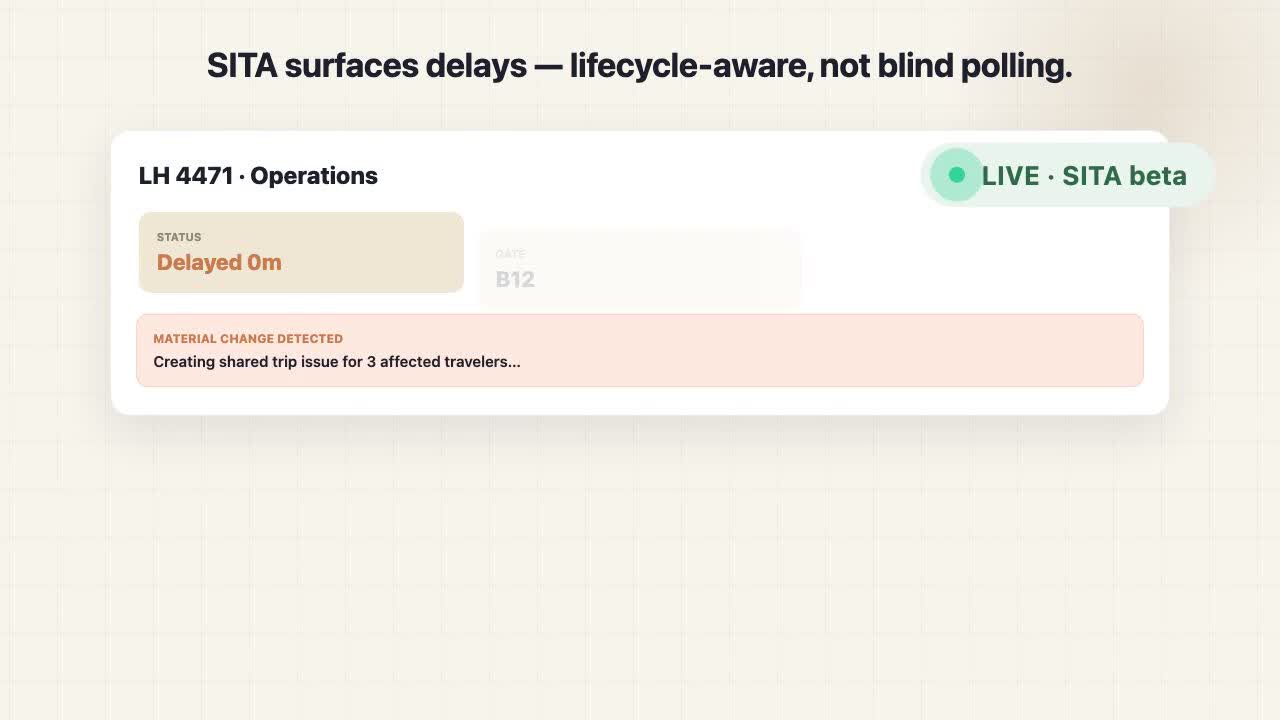
Read our mission →See how a SITA delay becomes a deduplicated shared issue, and how a HotelBeds benchmark attaches to the same trip — without leaving the workspace. About forty seconds, muted by default.
Five steps from scattered confirmations to live ops and spend intelligence your team can share.
Email confirmations to [email protected] — or type AA1999 on mobile.
TravelOps extracts dates, travelers, routes, and spend automatically.
Confirmations group into shared workspaces your team can open together.
Live feed, flight status, and disruption context on the Operations workbench (SITA beta).
Spend signals, policy flags, and lightweight approvals on Growth+ — finance sees trip-level rollups.
TravelOps is your trip command center with spend intelligence — clear ownership, clear data boundaries, and tooling your EA and finance leads can defend in a board conversation.
Trips, travelers, and card data stay inside your workspace — not mixed with other companies.
Keep a paper trail for finance: what was booked, when it changed, and who saw it.
AI assists extraction; your team confirms the trip. No black-box “auto-book” surprises.
Executive assistant
Stop reconstructing itineraries from threads. Trips group from email, receipts, and cards so you can answer “where are they?” in seconds.
Finance / ops
Match card spend to the trip window, surface policy gaps early, and give leadership a coherent travel narrative.
Traveler
Forward like today; get gates, delays, and trip context from your phone. Booking channel stays unchanged.
Cards tell you amount and merchant; TravelOps anchors spend to itineraries, travelers, and policy — so outliers show up before month-end.
Tier 1 verified paths — the partners TravelOps wires into product today for flight intelligence, lodging content, card sync, and zero-friction ingest.
Live flight intelligence and shared disruption actions (beta)
Reference content, trip enrichment, and policy-aware hotel benchmarks
Card transactions matched into trip workspaces
Card transactions matched into trip workspaces
Forward confirmations to your workspace address — no booking portal required
Travel ops shouldn't live in twelve different inboxes.
Enterprise tools force new booking habits. Expense tools strip away trip context. TravelOps ingests what you already booked, groups it into shared trips, and gives ops and finance a command center for live status and spend — without becoming your travel agency.
Tracked flights with SITA status, gates, and delays — plus a live feed of operational events and policy flags. Type AA1999 from your phone or forward a confirmation; spend signals surface on the dashboard when budgets drift.
Start freeTracked flights
Operations · T1 list viewBA 15
LHR → JFK
10:35
B42
On timeUA 901
SFO → LAX
14:20
F12
Delayed 18mTripIt Pro organizes the traveler's itinerary. Navan and Perk own the booking channel inside a managed travel program. TravelOps is the trip command center that sits on top of whichever channel your team already books through — adding shared disruption actions, policy-aware spend, and a durable record your whole workspace can rely on.
| Dimension | Manual workflow | TripIt Pro | Navan / Perk | TravelOps |
|---|---|---|---|---|
| Primary job | Forwarded emails, screenshots, and a shared sheet | Personal itinerary organization from forwarded mail | Booked travel + card spend in a single TMC platform | Trip command center layered on top of whatever channel your team already books through |
| Who owns the booking channel | Travelers book anywhere; no system of record | Traveler-owned; TravelOps does not change booking flow | TMC-owned; travelers book inside the platform | Channel-agnostic — email ingest, card sync, and optional TMC integration |
| Live ops during the trip | WhatsApp threads and ad-hoc pings when something slips | Consumer-grade delay / gate alerts to the traveler | Itinerary changes and agent rebook for booked travelers | SITA-backed status (beta) plus shared, deduplicated trip issues the whole workspace can act on |
| Spend intelligence | Card statement reconciled in a spreadsheet at month-end | Out of scope — itinerary only | Card + booking spend unified inside the TMC | Trip-anchored rollups, policy checks at extraction time, and optional Brex / Ramp sync |
| Pricing model | Hidden — your time and finance reconciliation overhead | Annual subscription per traveler | Per-booking fees inside a managed program | Governed travel records, not seats — predictable as operations scale |
Positioning summary, not a feature-by-feature comparison. Plan and configuration change what each tool actually delivers. We do not assert parity with Navan / Perk on TMC capabilities and we do not represent Flighty as a B2B competitor — it is a consumer flight tracker and not in our lane.
Plans are organized around operational maturity — shared trip command center, live flight operations, shared disruption actions, and policy-aware spend. Free proves the workflow. Growth is the recommended operating tier. Annual plans save 20% when paid upfront. Full feature list
Start free — no credit card required.
Forward a confirmation to your workspace ingest address ([email protected]) and you'll see it appear as part of a trip within minutes. Copy yours from Dashboard → Sources after signup.
No. TravelOps works with however your team books — email forwards, CSV imports from card exports, uploaded receipts. Employees keep booking wherever they want.
Yes. On Operations, type a flight number like AA1999 — optional if you don't have a confirmation handy. Forwarding emails still works best for full trip context.
By default, your workspace sees shared trips. You can optionally set a trip to private so only you and assigned travelers see its flights in Operations.
Yes — SITA-powered beta shows status, delays, and gate changes inside trips using lifecycle-aware scheduling (not equal polling for every flight). Free tracks one active flight live; paid plans track all workspace flights.
Yes — on Growth and Scale, connect Brex or Ramp OAuth or import CSV exports. Transactions match into trip workspaces for spend intelligence.
No. TravelOps is a trip command center: ingest, live ops, and spend signals tied to itineraries. Employees keep booking wherever they already do.
Policy checks at ingest, budget burn on Spend control, spend signals on the dashboard, and lightweight approvals on Growth+. Fare watch compares ingested hotel rates to policy when HotelBeds is configured.